Unity - Backend SDK 5.9.5 Build Error Fix (Burst DLL Conflict)
Unity Editor version where the error occurred: 2021.3.26f1 LTS
Entry point not found:
System.Exception: Error while hashing assemblies... my project path/Backend.dll
—> System.ArgumentException: An item with the same key has already been added...
If you attempt a build in this error state:
UnityEditor.BuildPlayerWindow+BuildMethodException: 5 errors
at UnityEditor.BuildPlayerWindow+DefaultBuildMethods.BuildPlayer...
This error occurs and the build fails.
This issue is caused by Unity's built-in Newtonsoft JSON version 13.
The Backend engine itself includes Newtonsoft JSON version 8.
Due to Burst package optimization, a collision occurs during the Unity build process.
When two files with the same role collide, the build fails.
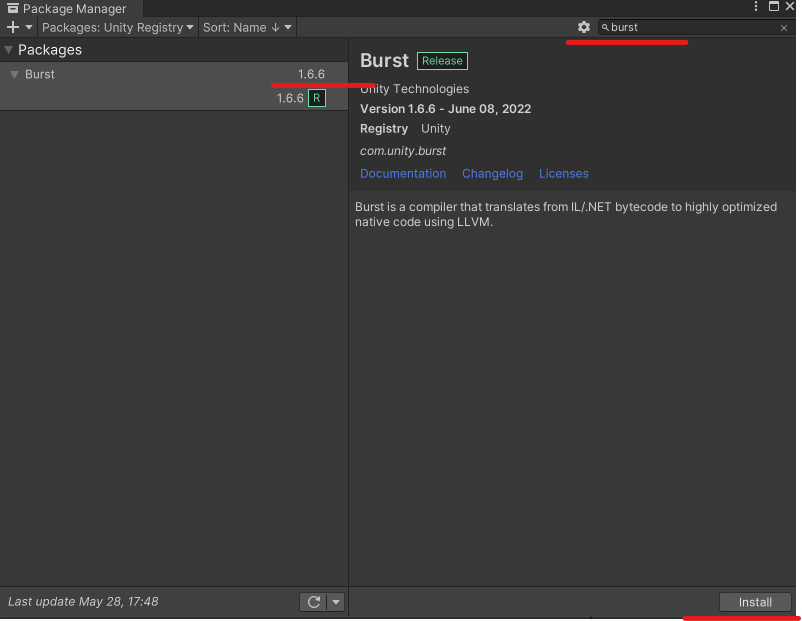
The simplest fix is to go to Unity's Package Manager
and downgrade the Burst version.
To downgrade, install a version lower than 1.7.3 from the Package Manager.
My 2021.3.26f1 version came with Burst 1.8.4 installed by default,
but the Burst package list shows Burst 1.6.6 as the recommended version.
So I installed version 1.6.6.
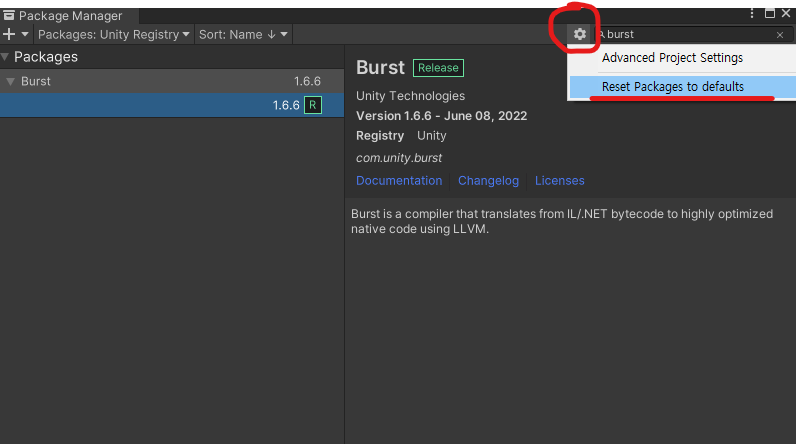
Once installation is complete, click on the installed 1.6.6 version.
Click "Reset Package to Default"
Then restart the editor.
The build completes successfully.
The Backend team has stated this issue will be addressed in a June-July update.
So if you're in a situation where you urgently need to build,
give this method a try.
UNITY 2021.3.19+ Burst DLL Conflict Issue